Agentic Playwright testing with Nix
I don’t do much front-end web development these days, but I enable people who do.
I use a lot of coding agents for my daily work with back-end APIs and service meshes.
I’ve known for a long time that agentic workflows instrumenting Playwright to run headless browser tests based on prompts has advanced quite a lot. I just haven’t got around to try it out.
tl;dr 
- Playwright, its browsers and its MCP server are all in nixpkgs. No
package.json, nonpm install, nonpx playwright install. - nixpkgs’
playwright-testhardcodes the full browser set into its wrapper, so the naive setup drags 2.2 GB of Chromium, Firefox and WebKit into your devshell whether you want them or not. I managed to push that down to 634 MB. - Headed Chromium and interactive debugging lives behind a flake-parts partition.
- The planner/generator/healer agents run on an existing Claude Code session.
- I practice TDD workflows for writing end-to-end tests.
The application under test 
The thing I’m practising on is a generic client area dashboard for a software service, written in Rust on topcoat with toasty. So I’m doing three things here: Testing topcoat, toying around with client dashboards, and getting my agentic playwright testing workflow up.
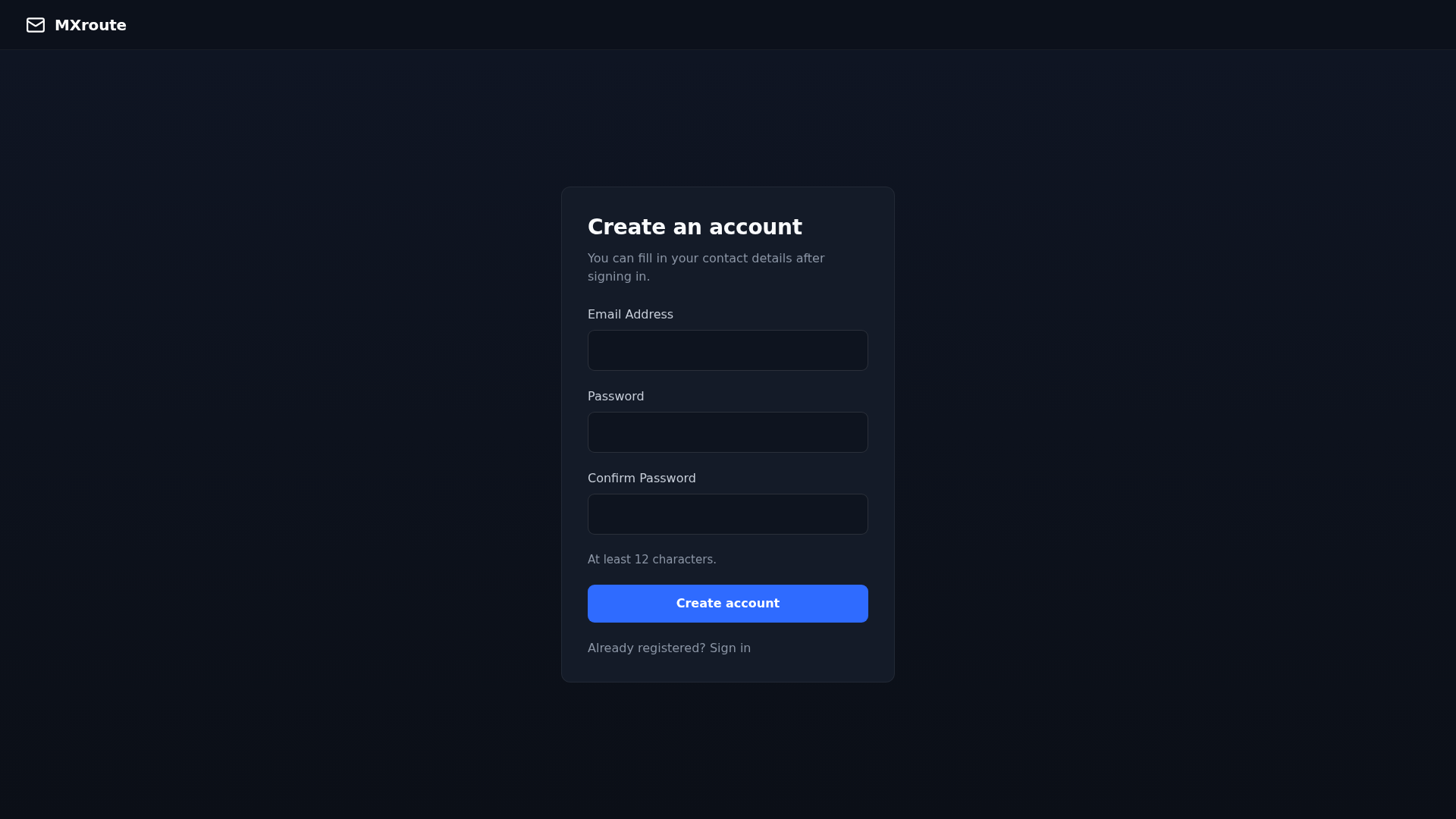
This screenshot was taken by the same flake-pinned headless Chromium that runs the tests, via a
just recipe:
shot path="/" out="shot.png":
    #!/usr/bin/env bash
    set -euo pipefail
    cargo build --package dashboard
    topcoat asset bundle --package dashboard --bin dashboard >/dev/null
    ./target/debug/dashboard >/dev/null 2>&1 &
    server=$!
    trap 'kill $server 2>/dev/null || true' EXIT
    for _ in $(seq 1 40); do
        sleep 0.25
        curl -sf http://127.0.0.1:3000/ >/dev/null 2>&1 && break
    done
    playwright screenshot --channel chromium-headless-shell \
        --viewport-size "1920, 1080" --wait-for-timeout 3000 \
        "http://127.0.0.1:3000{{path}}" "{{out}}"
Nixpkgs’ Playwright browsers set fontconfig_file so fonts render properly. You’re welcome.
A flake-parts module 
With dendritic flakes using flake-parts, all .nix files under some directory, say nix/, are
flake-parts modules and get auto-loaded. Exceptions are **/_*.nix, files that begin with _.
The whole Playwright setup is one such helper function:
# nix/_playwright.nix
{ pkgs, withChromium }:
let
  browsers = pkgs.playwright-driver.browsers.override {
    inherit withChromium;
    withFirefox = false;
    withWebkit = false;
  };

  playwright-test = pkgs.playwright-test.overrideAttrs (old: {
    installPhase =
      builtins.replaceStrings [ "${pkgs.playwright-driver.browsers}" ] [ "${browsers}" ]
        old.installPhase;
  });
in
{
  inherit browsers playwright-test;
}
The devshell takes it with withChromium = false to reduce the loading time:
# nix/devshell.nix
{ inputs, ... }:
{
  imports = [ inputs.devshell.flakeModule ];
  perSystem =
    { config, pkgs, lib, ... }:
    {
      devshells.default.imports = [
        (import ./_devshell-common.nix {
          inherit config pkgs lib;
          withChromium = false;
        })
      ];
    };
}
There is no package.json in this repository, no lockfile, and no node_modules.
When doing anything “the Nix way”, it generally means making a plan for what software needs to be installed, and making that software available by building it ahead of time in a sandbox. Running commands that cause installation as a side-effect means humans need to waste time learning things and failing to follow inaccurate, outdated documentation. Every single time. They clone.
Short story: You can skip all of npm yadda, npx yadda.
nixpkgs’ playwright-test wrapper already puts its own node_modules on NODE_PATH:
$ cat $(which playwright)
#! /nix/store/...-bash-5.3p15/bin/bash -e
NODE_PATH='/nix/store/...-playwright-test-1.61.1/lib/node_modules'$NODE_PATH
export NODE_PATH
export PLAYWRIGHT_BROWSERS_PATH=${PLAYWRIGHT_BROWSERS_PATH-'/nix/store/...-playwright-browsers'}
exec "/nix/store/...-nodejs-24.19.0/bin/node" .../@playwright/test/cli.js "$@"
So import { test, expect } from "@playwright/test" resolves in a Rust repository with no
JavaScript toolchain in sight, and the entire class of “npm playwright 1.55 against nixpkgs
browsers 1.61” bugs simply cannot happen, because there is only one version and the flake pins it.
A new developer on this project installs nix and runs direnv allow. They do not install Node or
run npx playwright install, or hit the “Host system is missing dependencies to run browsers” error
and go looking for libnss3, or silently accept that CI is ahead or behind, so “some things break
in CI but not locally.”
The browser that runs on the developer’s machine is the browser that runs in CI, because it’s the same store path.
Minimising the footprint 
pkgs.playwright-test has a runtime reference to the complete browser set. It’s baked into the
wrapper by --set-default PLAYWRIGHT_BROWSERS_PATH. Setting that variable yourself changes which
browser gets launched, but does nothing about the store reference, so the closure still contains
every browser:
$ nix path-info -S nixpkgs#playwright-test
/nix/store/...-playwright-test-1.61.1    2345 MB
Instead, build a smaller browser set:
/nix/store/...-playwright-test-1.61.1 634 MB
I’m not a front-end developer, and if I did a lot of front-end work, I would probably live with all browsers because it’s not very difficult to actually run your end-to-end tests in all the browsers.
| Browser | Closure | Own payload |
|---|---|---|
chromium_headless_shell | 418 MB | 261 MB |
chromium | 681 MB | 378 MB |
firefox | 1094 MB | 293 MB |
webkit | 1202 MB | 133 MB |
| all three (nixpkgs default) | 2197 MB | — |
A small browser might still drag in a lot of dependencies (GTK, GStreamer, etc.)
The smallest browser I could find is chromium_headless_shell built specifically for this. I think
it’s the default when using Playwright “the normal way”.
My development environment is already dominated by the Rust toolchain:
| Devshell | Closure | Δ |
|---|---|---|
| before | 2644 MB | - |
with chromium_headless_shell | 3006 MB | +362 MB |
with headed chromium | 3500 MB | +856 MB |
Headed Chromium as a partition 
I haven’t tried Playwright’s “headed mode”, but I’ve heard it is nice for interactive debugging.
Headed mode covers --ui and codegen commands.
Until I try that out, I’ve put headed Chromium in a flake-parts partition to keep
them out of the flake.lock and cause a smaller dependency footprint until activated.
# nix/partitions.nix
{ inputs, ... }:
{
  imports = [ inputs.flake-parts.flakeModules.partitions ];

  partitionedAttrs.devShells = "headed";
  partitions.headed.module = ./_headed.nix;
}
# nix/_headed.nix
{
  perSystem =
    { config, pkgs, lib, ... }:
    {
      devshells.headed = {
        imports = [
          (import ./_devshell-common.nix {
            inherit config pkgs lib;
            withChromium = true;
          })
        ];
        env = [
          { name = "PW_HEADED"; value = "1"; }
        ];
      };
    };
}
Then nix develop .#headed gets you a browser you can watch.
The config picks the channel off the environment variable, so one config serves both shells:
// e2e/playwright.config.ts
projects: [
  {
    name: "chromium",
    use: {
      ...devices["Desktop Chrome"],
      channel: process.env.PW_HEADED ? undefined : "chromium-headless-shell",
    },
  },
],
Playwright agents 
Now that installing Playwright is done, let’s get schwifty with agents!
Playwright 1.56 added Playwright Agents: three of them, generated by
playwright init-agents --loop=claude
- planner explores the running application and writes a test plan as Markdown.
- generator turns a plan into executable TypeScript, verifying selectors against the live page as it goes.
- healer takes a failing test, replays it, looks at what the UI actually does now, and patches the test.
This works out of the box with a pre-authenticated claude CLI.
Test-driven development 
After one-shotting the dashboard, account creation appeared broken: you could sign up, but then logging in with that account failed. This is why end-to-end testing is necessary.
test("creates an account and logs in with it", async ({ page, context }) => {
  const email = uniqueEmail();

  await test.step("create the account", async () => {
    await page.goto("/signup");
    await page.getByLabel("Email Address").fill(email);
    await page.getByLabel("Password", { exact: true }).fill(PASSWORD);
    await page.getByLabel("Confirm Password").fill(PASSWORD);
    await page.getByRole("button", { name: "Create account" }).click();
    await expect(page).toHaveURL("/profile");
  });

  await test.step("discard the session", async () => {
    await context.clearCookies();
    await page.goto("/");
    await expect(page).toHaveURL(/\/login/);
  });

  await test.step("log in with the new account", async () => {
    await page.goto("/login");
    await page.getByLabel("Email Address").fill(email);
    await page.getByLabel("Password", { exact: true }).fill(PASSWORD);
    await page.getByRole("button", { name: "Sign in" }).click();
    await expect(page).toHaveURL("/");
    await expect(page.getByRole("heading", { level: 1 })).toHaveText(`Welcome, ${email}`);
  });
});
getByLabel and getByRole go through the accessibility tree, so the test breaks when the page
stops being usable, not when someone renames a CSS class. This is the default style the generator
produces.
✓ e2e/tests/auth.spec.ts:13:5 › creates an account and logs in with it (2.8s)
But it doesn’t work when I sign up and try to log in.
The database only had some test user, not the one I tried to create. That user had other database entries, suggesting the database access wasn’t at fault. But a user creation had never happened.
The minimum password length is 12. Sign up with a shorter one and the handler bounced me back to
/signup?error=short, which re-rendered the same form with an error under the password field that I
overlooked because those errors weren’t in the mock layout and rendered very plainly.
Authentication worked fine, but signup validation didn’t render nicely and wasn’t server-side.
Oops! How could you do this to me, Opus 5?
Test conventions 
I’m always reluctant to put stuff in CLAUDE.md because it gets stuffy and old quickly: Is the thing you say really general to your project and non-trivial? A new model will have capabilities the old one doesn’t and instructions in CLAUDE.md compensate for model insufficencies.
I experienced that Claude makes very weirdly named test fixtures, this belongs in a test skill. Assuming people will contribute to a project and not care to read the tests they generate, having policies on how to name tests, and when to write them, seems like a “human guardrail” you might like.
For example, name tests after the test invariant, not the incident:
- holds back a password that breaks the rule the form states
- enforces password validation server-side, not only in the browser
- protects an existing account confidentially from a second signup
- normalizes emails when comparing for existing accounts during signup
At least 12 characters 
The following test does fail:
test("holds back a password that breaks the rule the form states", async ({ page }) => {
  await page.goto("/signup");
  await expect(page.getByText(`At least ${MIN_PASSWORD_LENGTH} characters.`)).toBeVisible();

  const password = page.getByLabel("Password", { exact: true });
  const tooShort = "x".repeat(MIN_PASSWORD_LENGTH - 1);

  await page.getByLabel("Email Address").fill(uniqueEmail());
  await password.fill(tooShort);
  await page.getByLabel("Confirm Password").fill(tooShort);

  await expect(password).toHaveJSProperty("validity.valid", false);

  await page.getByRole("button", { name: "Create account" }).click();

  // Never submitted, so never bounced: no ?error= round trip to overlook.
  await expect(page).toHaveURL("/signup");
});
Red, with a precise complaint:
✘ holds back a password that breaks the rule the form states
  Error: expect(locator).toHaveJSProperty(expected) failed
  Expected: false
  Received: true
  locator resolved to <input required id="password" name="password" type="password" .../>
For the code geeks out there, the fix looks like:
                     field(
                         name: "password",
                         label_text: "Password",
                         kind: "password",
                         error: complaint
                             .filter(|c| *c == Complaint::ShortPassword)
                             .map(Complaint::message),
                         attrs: topcoat::view::attributes! {
-                            required="" autocomplete="new-password"
+                            required="" autocomplete="new-password"
+                            minlength=(MIN_PASSWORD_LENGTH)
                         },
                     )
And the test goes green.
Applying that fix immediately broke a different test that asserted the text “Use at least 12 characters.” appears on the form after submitting. Once the browser refuses to submit, that message becomes unreachable through the UI.
So it became an API-level test that posts straight past the form:
test("enforces the password rule at the server, not only in the browser", async ({ request }) => {
  const response = await request.post("/signup", {
    form: { email, password: tooShort, confirm_password: tooShort },
    maxRedirects: 0,
  });
  expect(response.status()).toBe(303);
  expect(response.headers()["location"]).toContain("error=short");
});
This test is better anyways. Web applications must not rely on client-side validation. This reminds me to add the class of bug to perpetually scan for when revisiting code coverage. This only came up because the test was made to go from red to green (TDD). The order is completely necessary when doing agentic testing.
The MCP server 
When I restarted Claude Code in this repository, it asked whether I wanted to enable an MCP server
it had found. That’s .mcp.json, which init-agents wrote, and which Claude Code treats as
project-scoped configuration requiring explicit approval — reasonably, since it’s an executable
another tool put in my repository:
{
  "mcpServers": {
    "playwright-test": {
      "command": "playwright",
      "args": ["run-test-mcp-server", "--headless", "-c", "e2e/playwright.config.ts"]
    }
  }
}
command is just playwright, not npx playwright. The generated file uses npx, which would
be a network fetch of an unpinned version, and would fail here because there’s no npm on PATH.
Since the devshell provides playwright, the flake-pinned version is what gets used. The MCP server
and the test runner are then guaranteed to be the same version, which they may not be if you let
npx pick.
playwright run-test-mcp-server is a subcommand of Playwright itself even though it’s not listed
in playwright --help (who doesn’t auto-generate --help these days?). I’d initially wired up
nixpkgs’ separate playwright-mcp package before noticing that all three agent definitions only
reference mcp__playwright-test__* tools.
playwright-mcp resolves its browser as “chrome-for-testing” and refuses to fall back to a headless
shell, so avoiding this package keeps the flake lean. The built-in MCP server has all the necessary
tools for the three agents to work.