
A git primer for future colleagues
You become a git expert when you learn about git reflog. Not because it’s an advanced feature.
But because it gives you the confidence that whatever command you run can be reverted.
Once you can undo any git command, your willingness to experiment increases significantly, and you become the export.
Besides that, git reflog is not the most useful command, since it’s mostly for when you fucked up,
which is less and less.
Here’s a list of more useful low-risk, high-yield commands you should know about.
Table of contents 
git commit --amendgit add -pgit commit -vgit push --force-with-leasegit rebase / git pull --rebasegit rebase -igit commit --fixupgit rebase -i --autosquash
git commit --amend

You made a commit and submitted a pull request, and you found out you need to make some changes.
Make a few changes, commit them, and now you suddenly have a less readable commit history.
That second commit was a part of the review process and does not serve future readers.
commit b3f9a21 (HEAD -> feature-login)
Author: Simon Shine <simon@simonshine.dk>
Date:   Fri Feb 14 10:45:23 2026 +0100

    Fix typo in error message

commit a7c8d42
Author: Simon Shine <simon@simonshine.dk>
Date:   Fri Feb 14 09:30:15 2026 +0100

    Add user login functionality
Instead, you can git add your changes and git commit --amend.
This adds your changes to the most recent commit (HEAD) instead of its own.
One rule: You can only amend commits that aren’t shared with others yet.
git add -p

You made a lot of changes, and now you’re ready to commit them. There was some trial-and-error, and you also made some unnecessary changes; failed attempts, random edits here and there. Don’t include them in your git commit. But undoing them is tedious.
Instead, git add -p progressively, meaning repeatedly, asks if you want to add another change.
$ git add -p
diff --git a/src/auth.js b/src/auth.js
index 1a2b3c4..5d6e7f8 100644
--- a/src/auth.js
+++ b/src/auth.js
@@ -10,7 +10,7 @@ function validatePassword(password) {
-  return password.length >= 8;
+  return password.length >= 12;
 }
Stage this hunk [y,n,q,a,d,s,e,?]? y

diff --git a/src/auth.js b/src/auth.js
@@ -25,6 +25,7 @@ function login(username, password) {
+  console.log("DEBUG: login called");
   if (validatePassword(password)) {
Stage this hunk [y,n,q,a,d,s,e,?]? n

diff --git a/package-lock.json b/package-lock.json
@@ -1234,5 +1234,5 @@
-    "version": "1.0.0",
+    "version": "1.0.1",
Stage this hunk [y,n,q,a,d,s,e,?]? n
This gives you a chance to review your changes before committing and submitting a pull request.
For example, were those debug prints or the changes to your package lock really necessary?
git commit -v

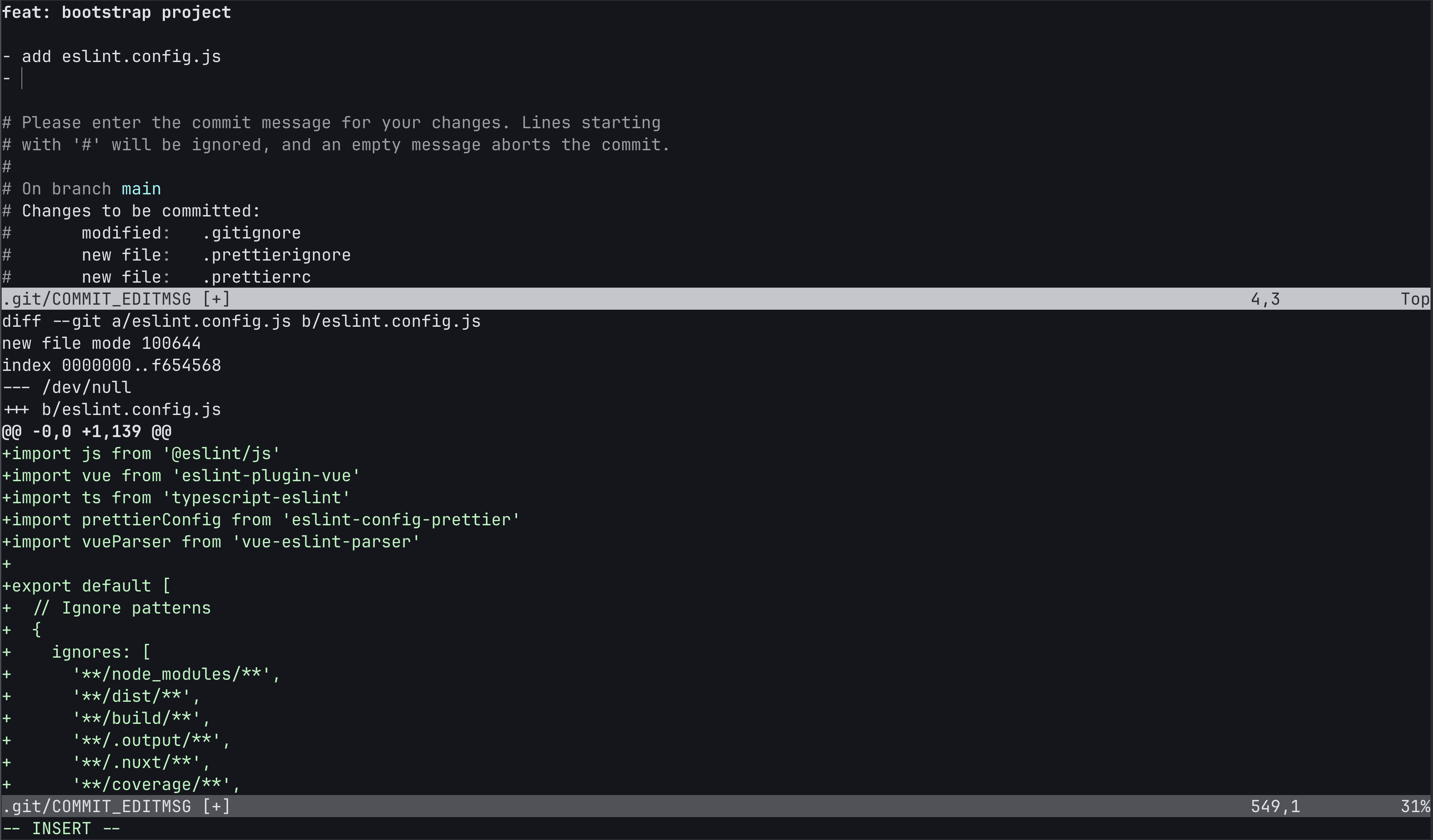
--verbose or just -v makes all the changes appear in the commit message editor.
To write a good commit message, having the content of your commit in your editor while composing the message is valuable. Nowadays you might prefer for an AI to write your commit message. But I still find plenty of occasions to run Vim (Neovim) in split window mode, one window focusing on composing, and the other on what’s being committed:
git push --force-with-lease

You have learned that git push --force is bad.
This is true.
You might risk discarding changes made by yourself or others without the ability to undo.
But without force-pushing, rebase workflows will not work, since rebase rewrites history.
The safe alternative is git push --force-with-lease.
It prevents you from accidentally overwriting other people’s commits.
How --force works:
- Unconditionally overwrites the remote branch with your local branch
- Ignores what’s currently on the remote
- Can destroy commits that teammates pushed while you were working
How --force-with-lease works:
- Only succeeds if the remote branch is at the exact commit you last fetched
- Fails if someone else pushed commits since your last
git fetch/git pull - Uses a “compare-and-swap” operation: “I expect the remote to be at commit X; only update if true”
Why it’s safer: When you git fetch, Git records the remote branch’s position (the “lease”).
--force-with-lease checks: “Is the remote still where I think it is?” If yes, push succeeds. If no
(someone pushed), push is rejected, forcing you to fetch and review their changes first.
git rebase / git pull --rebase

Rebasing means replaying your commits onto another branch.
Let’s say you create a feature branch when ‘main’ is at commit E, and by the time you’re done, others have merged things so that the HEAD commit of ‘main’ is now G. Your feature branch is ready to merge, but between E and G, there might be changes overlapping with those on your feature branch.
Before rebase:

          A---B---C feature
         /
    D---E---F---G main
On the feature branch, you hit git rebase main.
After rebasing 'feature' onto 'main':

                  A---B---C feature
                 /
    D---E---F---G main
You want to make git rebase a core part of your daily workflow.
Here are two examples of rebasing in practice:
In the morning before you resume work on your feature branch, you sync your ‘main’ branch and your feature branch:
- Stash any uncommitted changes (using
git stashor a WIP commit), - So that you can
git switch mainto switch to your main branch, - Fetch any changes on ‘main’ using
git pull --rebase --prune, - Then
git switch featureback andgit rebase main, - Now your feature branch is sync’ed with ‘main’, and you can resume work.
This prevents your feature branch from drifting away when working on it for a longer period of time.
It also keeps your local ‘main’ branch up to date in a safe way, preventing merge commits.
git rebase -i

Interactive rebasing lets you rewrite history before merging a pull request.
Run git rebase -i HEAD~3 to edit the last 3 commits. You’ll see:
pick a1b2c3d Add login feature
pick e4f5g6h Fix typo in login
pick i7j8k9l Update tests

# Rebase commands:
# p, pick = use commit
# r, reword = use commit, but edit message
# e, edit = use commit, but stop for amending
# s, squash = use commit, meld into previous commit
# f, fixup = like squash, but discard commit message
# d, drop = remove commit
Change pick to:
rewordto edit a commit messagesquashorfixupto merge commits togetherdropto remove a commit entirely- Or reorder lines to move commits around
git commit --fixup

You found a bug in an earlier commit, not just HEAD.
You could use git rebase -i to squash it manually, but there’s a shortcut.
Say commit a1b2c3d has the bug. Make your fix and run:
git commit --fixup a1b2c3d
This creates a commit with the message fixup! Add login feature that’s marked for squashing into a1b2c3d later.
git rebase -i --autosquash

After making fixup commits during code review, clean up your branch:
git rebase -i --autosquash main
Git automatically reorders and marks your fixup commits for squashing:
pick a1b2c3d Add login feature
fixup e4f5g6h fixup! Add login feature
pick i7j8k9l Update tests
No manual reordering needed. The fixup commits disappear into their target commits.
You can make this the default with git config --global rebase.autosquash true.