Non-interactive Tailscale API login with sops-nix
For the past three years I’ve connected my Nix machines using Tailscale by running sudo tailscale login once per machine.
I’ve known that you can actually log onto a Tailnet with an API key.
Why bother? Running sudo tailscale login takes ten seconds, your browser’s password manager kicks in, you’re done.
This is actually simple and ships almost out of the box, if you already have sops-nix secrets management in your system configuration.
But it comes with three drawbacks:
- You probably need secrets management as part of your system configuration
- API keys expire after at most 90 days, so the recipe now needs renewal
tl;dr 
{ config, ... }:
{
  sops.secrets.tailscale_authkey.sopsFile = ../../secrets/dao/tailscale.yaml;

  services.tailscale = {
    enable = true;
    authKeyFile = config.sops.secrets.tailscale_authkey.path;
  };
}
That’s it.
0. Programs you’ll need 
In the sops-nix flake template I use a flake-parts module like so:
{ inputs, ... }:
{
  perSystem =
    { pkgs, ... }:
    {
      devshells.default = {
        packages = [
          pkgs.age
          pkgs.sops
          pkgs.ssh-to-age
        ];
      };
    };

  flake.nixosModules.default = inputs.sops-nix.nixosModules.sops;
}
You could also just go with a NixOS module if you haven’t drunk the koolaid:
{ pkgs, ... }:
{
  environment.systemPackages = [
    pkgs.age
    pkgs.sops
    pkgs.ssh-to-age
  ];
}
There’s a few ways to install sops-nix without flakes, too (niv, fetchTarball).
1. Make the host a sops recipient 
In my sops-nix flake template I define a user key for me to decrypt a secret used in my system configuration. That gives me personal access to decrypt a certain key. That tutorial says you can use any SSH key, including the system SSH server’s host key which gets generated when the system bootstraps.
I’ll use this host key as the identity in my Tailnet, because my user SSH keys are tied to the machines I connect from, not the machines I connect to: Not all Nix machines I have are jumphosts, but they all have SSH servers running.
sops-nix decrypts with the host’s ssh_host_ed25519_key by default.
Turn the host’s public key into an age recipient:
$ cat /etc/ssh/ssh_host_ed25519_key.pub | ssh-to-age
age12m53ejfqfc244fp2ryhehxzadhuxflt4jkvqxp0f4j9vzk554gtsgtkupc
Add it to .sops.yaml alongside your admin key.
Keep host secrets in their own path so the host is only a recipient of what it actually needs.
In this example, the server that is joined into my Tailnet is called dao:
keys:
  - &sshine age1dmpgxjdt7g6r4rc9606ktrzmzzdktf9p8exhed0xzcdcr5su3y5st5vff5
  - &dao    age12m53ejfqfc244fp2ryhehxzadhuxflt4jkvqxp0f4j9vzk554gtsgtkupc
creation_rules:
  - path_regex: secrets/dao/[^/]+\.yaml$
    key_groups:
      - age: [*sshine, *dao]
  - path_regex: secrets/[^/]+\.yaml$
    key_groups:
      - age: [*sshine]
2. Generate an auth key 
In the Tailscale admin panel, under Settings → Keys, generate an auth key:
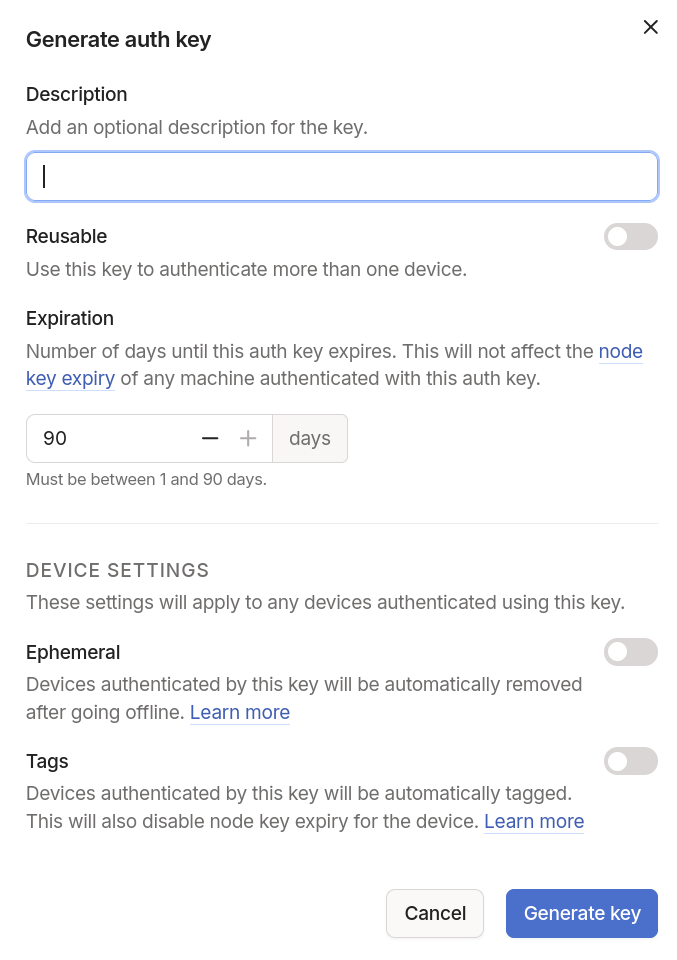
I’ve made my auth key:
- Reusable: The config repo for this server is shared with other servers, so repeating the API key makes it very easy for the next machine to join (in the next 90 days). They’ll need to have their own sops-nix decryption keys, though.
- Pre-tagged: This leaves the authentication not expire; the 90 day expiration applies only to new machines, already authenticated machines that are tagged don’t expire.
Ephemeral keys sound really cool: It means you can make a Tailnet that people join and leave, and it doesn’t leave a trace of stale machines. There’s a lot of exploration in how tagging works, too.
3. Encrypt the key 
$ sops edit secrets/dao/tailscale.yaml
tailscale_authkey: tskey-auth-xxxxxxxxxxxx-xxxxxxxxxxxxxxxxxxxxxxxxxxxxxxxxxx
sops encrypts to both recipients from the matching creation rule. Verify:
$ sops --decrypt secrets/dao/tailscale.yaml
tailscale_authkey: tskey-auth-...
4. Wire it into the machine 
This is the easy part: Just name the secret and point Tailscale at its runtime path:
{ config, ... }:
{
  sops.secrets.tailscale_authkey.sopsFile = ../../secrets/dao/tailscale.yaml;

  services.tailscale = {
    enable = true;
    authKeyFile = config.sops.secrets.tailscale_authkey.path;
  };
}
config.sops.secrets.tailscale_authkey.path is /run/secrets/tailscale_authkey.
You don’t set sops.age.sshKeyPaths: it defaults to the host’s ed25519 key,
which is exactly the recipient from earlier.
You’re done!
Conventions 
- Derive the host recipient from
ssh_host_ed25519_key; treat it as a separate recipient from your admin key, never a copy of it. - Put per-host secrets under
secrets/<host>/so acreation_rulesregex decides who can decrypt. authKeyFilewants a path, so a single-use key never lands in the store or a build log, only in/run/secrets.- Re-run
sops updatekeys secrets/**/*.yamlafter changing.sops.yaml.